Subscription Types
- Access the memberbase dashboard.
- Navigate to subscription types.
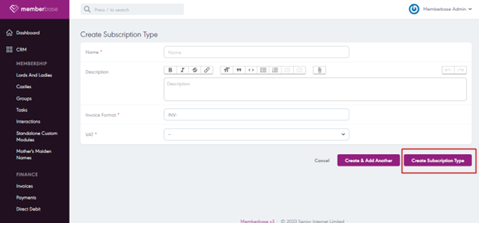
- Click on “Create subscription types”.

- Input the required fields.
- Finally, click on “Create subscription type”.
Related Articles
Membership Types
- Access the memberbase dashboard. - Navigate to membership types - Click on create membership type. - Input the required field. - Finally, click on the “create membership type” button.Direct Debit (Go Cardless)
Have you ever lost a member or subscriber because their credit card failed, expired, or was delinquent? You're not alone! According to Patrick Campbell, Co-Founder & CEO of ProfitWell, between 20-40% of churn is due to these types of issues, ...E-Alerts:
The E-Alerts feature allows users to subscribe to receive email alerts or notifications about specific events or updates on your website. To set up E-Alerts: - Log in to the Senior River CMS admin panel. - Navigate to the "E-Alerts" button. - Click ...Adding a tab
Using tabs, you can organize properties in the backoffice to provide a tailored and efficient workflow for editors creating and maintaining Content, Media and Members. Tabs allow you to add horizontal organization in your Document Types, Media Types ...Creating a User Group
You can also create your own custom User Groups and add properties and tabs as you would with Document Types and Member Types. - Navigate to the Users section. - Select the Groups tab in the top-right corner, ' - Select Create Group and you will be ...